
Devlog #1: from walking sprites to a living battlefield
First published on Selling Yorkshire, 25 September 2026. This is a copy; the original is the canonical version.
Welcome to the first devlog for Templar: Oath of Outremer, a real-time strategy game for your phone. It began life as Outremer: Battlegrounds, and you may still see that name in a few places while the new look settles in.
You command a Frankish host of 12th-century Outremer against an Ayyubid army, across three historic fields: Montgisard (1177), the Horns of Hattin (1187) and Arsuf (1191). It’s built in plain JavaScript with Canvas 2D and 16-bit, SNES-style pixel sprites, and it runs in Safari or as a home-screen web app.
It’s a playable prototype, not a finished game. Tom builds it with his AI build-mate, Thanos, and plays and tests it on an iPhone and a laptop. This first post looks back over the week since we picked the project up again. Future entries will be shorter, one per batch of changes.
Where we started
Before there were Templars, there was a test. The very first prototype, “Stellar Battlegrounds”, was a generic sci-fi skirmish on a dark map, with plain ring-shaped units, a command post and energy crystals to gather. It let us try the basics on a phone: tap to select, tap to move, and gather resources.
On the evening of 19 September it became the first Outremer build: small hand-drawn figures, a keep and grain fields at Montgisard, 1177, with no pixel sprites yet. We didn’t save screenshots of either, so the images were re-rendered on 26 September from the original code.
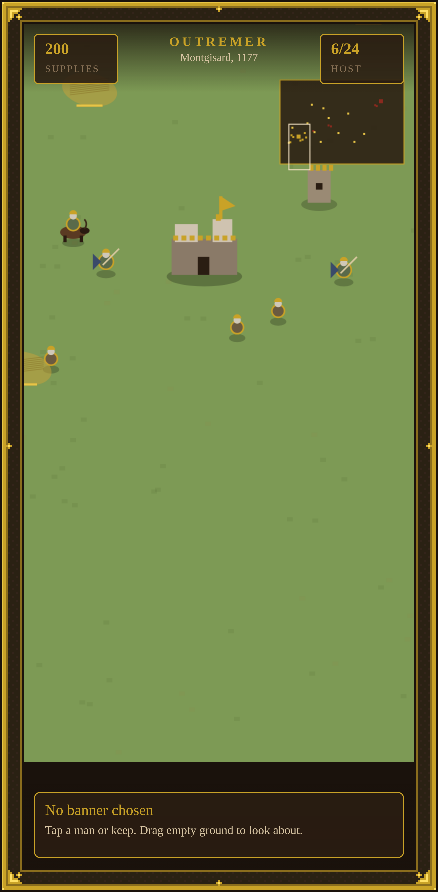
The first sprite build
On 19 September we resumed work from Tom’s real source files. The bones were already there: a keep, camp followers, spearmen, crossbowmen, turcopoles and knights, four stores (grain, timber, coin and stone), and the three fields to choose from.
Walking and galloping
Our first job was to make the host feel alive. Units used to glide across the map, so we added a simple two-frame walk from the existing sprites: foot soldiers bob as they march and mounted troops bob faster, like a gallop. When they stop, they settle back to a still frame so nothing jitters.
Clearer orders, and drag to select
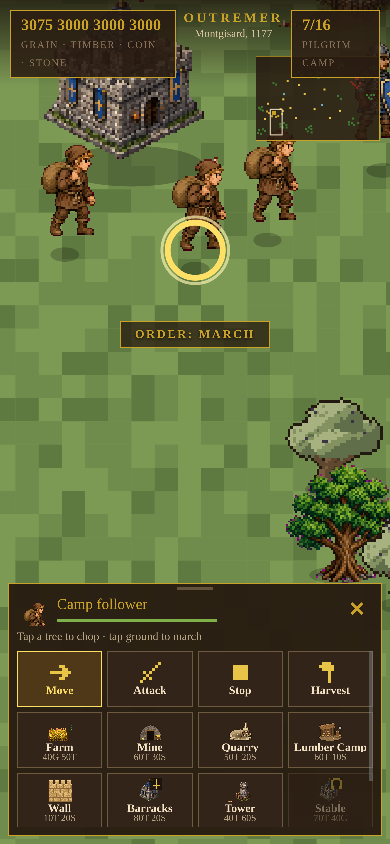
Between 19 and 24 September we worked on making orders obvious on a small screen. Select a unit and you now get clear Move, Attack, Harvest, Build and Stop actions, with the current order shown on screen. We checked some sprite caching problems, set resources to tick in automatically, and added drag box-select so you can sweep up a whole group in one go. Box-select went live on 24–25 September.
A close button and proper laptop controls
On the morning of 25 September the selection panel got a ✕ close button, and Esc does the same on a keyboard. Laptop play got a real set of controls too: right- or middle-drag to pan, WASD or the arrow keys to scroll, the mouse wheel to zoom, and a click on the minimap to jump straight there.
Training queues, gold mines and stone walls
The first big batch went live at about 17:43 on 25 September. Buildings now have training queues of up to five units, from 6 seconds for a camp follower to 18 seconds for a knight, and the Ayyubid side queues its troops as well.
Coin now comes only from gold mines (60 timber, 30 stone, 0.8 coin a second). Mines and towers can each be upgraded through three tiers: mines to 0.8, 1.4 and 2.2 coin a second, towers to 6, 11 and 18 damage, and your starting tower begins at level 2. You can also build stone walls (10 timber, 20 stone, 400 hit points). Units steer around them, and the enemy will try to break through. The Ayyubid army cap also grows from 12 to 20 as the battle goes on.
Rally banners, the Forge and the Ayyubid host
The next batch went live at about 20:48. Idle soldiers now defend themselves: they engage enemies that come within range, chase up to 200 pixels, then return to their post. The keep, barracks and stable can set a rally point, marked by a big white banner with a red Templar cross that waves in the wind.
The Forge (80 timber, 60 stone) lets you research Blades, Bows and Lances, three tiers each. The Ayyubid side now keeps a garrison and sends attack waves. The first comes at 150 seconds, and later waves grow larger and arrive sooner. You’ll know one is coming when you see “The Ayyubid host marches!”

Forests of the Levant, quarries and lumber camps
The latest batch went live at about 22:33. The fields now have Levant forests: oak and terebinth, olive, Aleppo pine and date palms. Every tree can be chopped for 150 timber and leaves a stump behind.
Two new buildings take care of the chores. The Quarry (50 timber, 20 stone) produces 0.6, 1.1 or 1.8 stone a second depending on its tier. The Lumber Camp (60 timber, 10 stone) runs two, three or four woodcutters of its own (depending on tier), who find the nearest trees by themselves and respawn after 20 seconds.
Tidier sprites, a building grid and a slimmer panel
The same batch cleaned up the pink fringe on 14 sprites, which had shown up as a thin magenta halo on the field.

Buildings now snap to a 32-pixel grid. A green ghost means you can build there and a red one means you can’t, buildings can no longer be stacked on top of each other, and you can drag out a whole line of wall in one go.
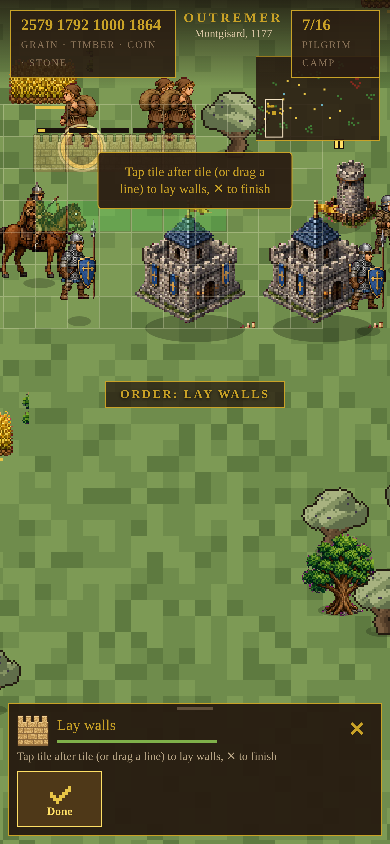
We also redesigned the selection panel. It now takes up no more than 30% of the screen and uses a grid of icon buttons. Swipe down, tap ✕ or press Esc to close it, tap a queued unit to cancel it and get a refund, and on a keyboard use 1 to 0 as hotkeys.
What we learned
- Batching works. Grouping changes into a few tested releases a day made each release easier to check and gave us clear points to look back on.
- Test on both screens, every time. Something that feels fine with a mouse can be fiddly with a thumb, and the other way round.
- Keep pixel art crisp. Smoothing stays off in the renderer, and screenshots are resized with nearest-neighbour so the sprites stay sharp.
- Keep screenshots from day one. We didn’t, which is why our “where we started” images had to be re-captured.
What’s next
These were in progress at the time. No promises on dates:
- An economy rebalance. Grain has been far too plentiful, and gold should be the scarce resource.
- A clearer resource display at the top of the screen.
- A visible Ayyubid camp with its own buildings and stockpile.
- A Grain Store, Lumber Yard and Gold Vault that can be raided for plunder.
Thanks for reading. If you try the game, we’d love to hear how it plays on your device.